AI Strategy Assistant —
Turn Your Instructions into Automated Trades
For traders who already have a strategy in mind: the AI Strategy Assistant turns your investment ideas into reality so you can start automated trading quickly.
Natural-Language Input
AI Strategy Enhancement
Intelligent Risk Control

Multi-Dimensional Analysis
Five-Year Institutional-Grade Backtesting
24-Hour Automated Execution
What Is the MASQuant AI Strategy Assistant?
Inside the app, the AI Strategy Assistant turns your own trading idea into a strategy in six steps:
- Build your trading logic — start from an idea such as a moving-average crossover, RSI overbought/oversold, Bollinger Band breakout or MACD trend strategy, or describe your own trading rules directly.
- Choose technical indicators — combine indicators such as moving averages, RSI, MACD, Bollinger Bands, ATR and Stochastic however you like.
- Set entry and exit conditions — for example, enter when RSI is below 30 and price breaks above the moving average; exit when RSI is above 70 or the stop-loss is triggered.
- AI analysis and parameter optimization — the AI analyses instrument characteristics, volatility structure, market behaviour and historical data to find the parameter combinations that fit best.
- Backtest the strategy — review the return, win rate, maximum drawdown, Sharpe ratio and equity curve.
- Deploy to MT5 — the system generates the executable file and packages the strategy for MT5, so you don’t need to write any MQL5 code.

Describe your trading logic in natural language, for example: “Enter when RSI is below 30 and exit when price breaks above MA20.” The AI Strategy Assistant interprets it in real time and generates the strategy automatically.

Built-in conditions for common technical indicators let you quickly set up a strategy’s entry and exit logic, without the hassle of writing complex formulas.

Based on the strategy logic you enter, the AI Strategy Assistant flags any missing key conditions, such as stop-loss or timeframe, and produces a complete logic summary to help you confirm step by step that the strategy works as intended.

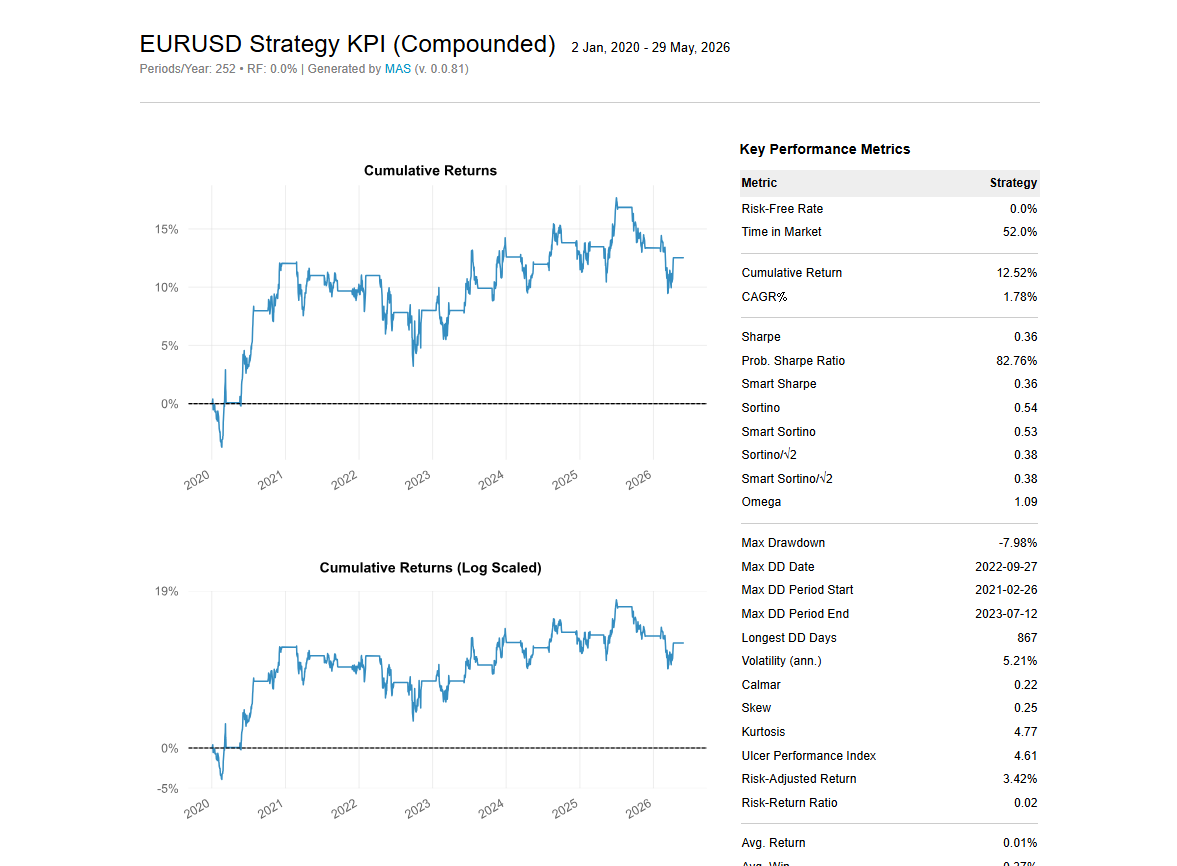
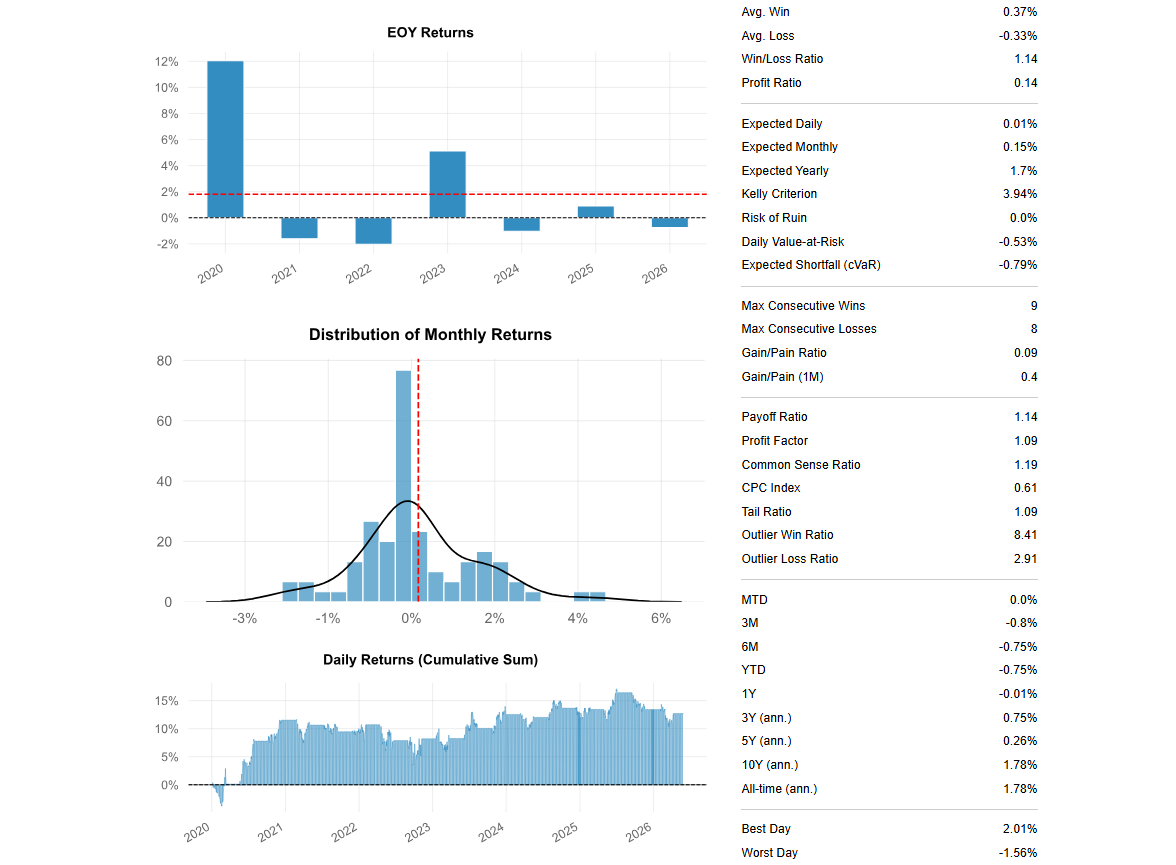
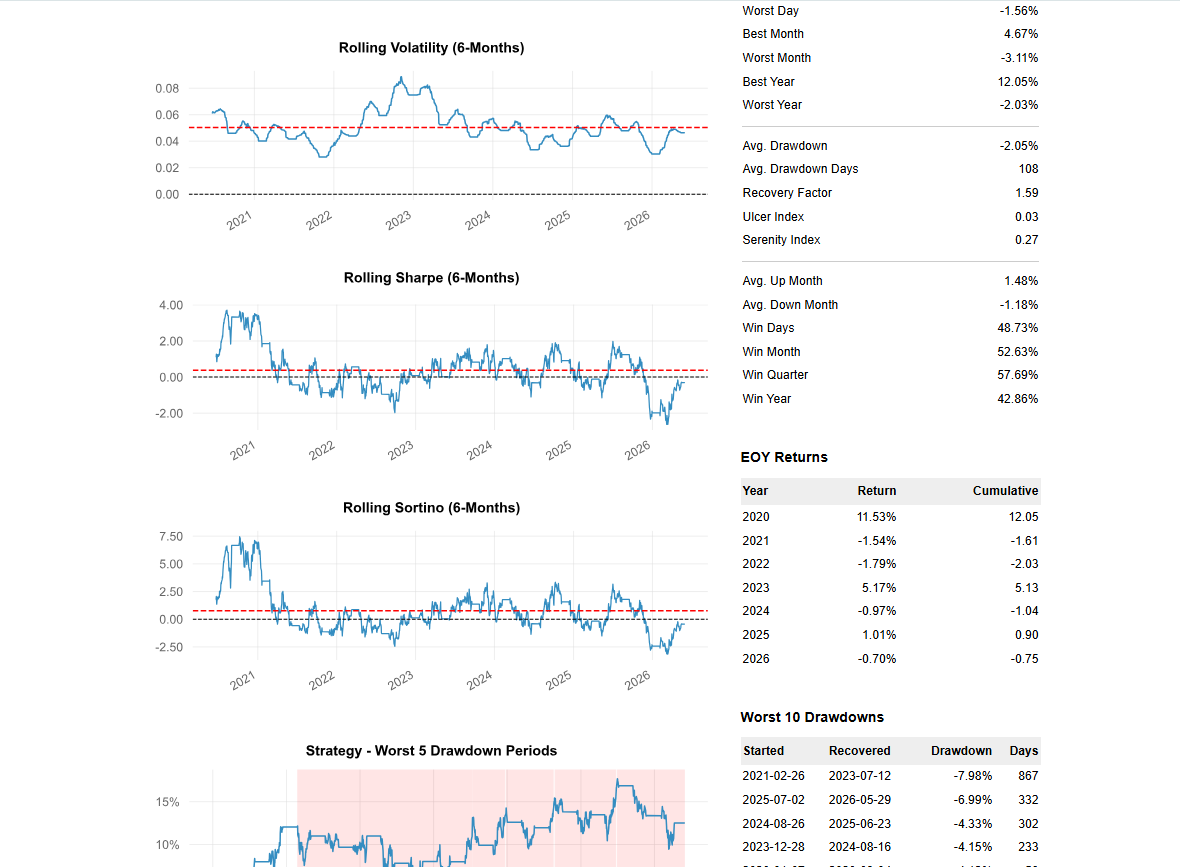
Validate a new strategy’s profit and loss potential and risks with historical data, helping you evaluate its win rate, expected value and maximum drawdown before committing real money, instead of relying on intuition or luck and taking unnecessary losses. Backtests support dynamic charts to help you check strategy stability and see where to optimize.

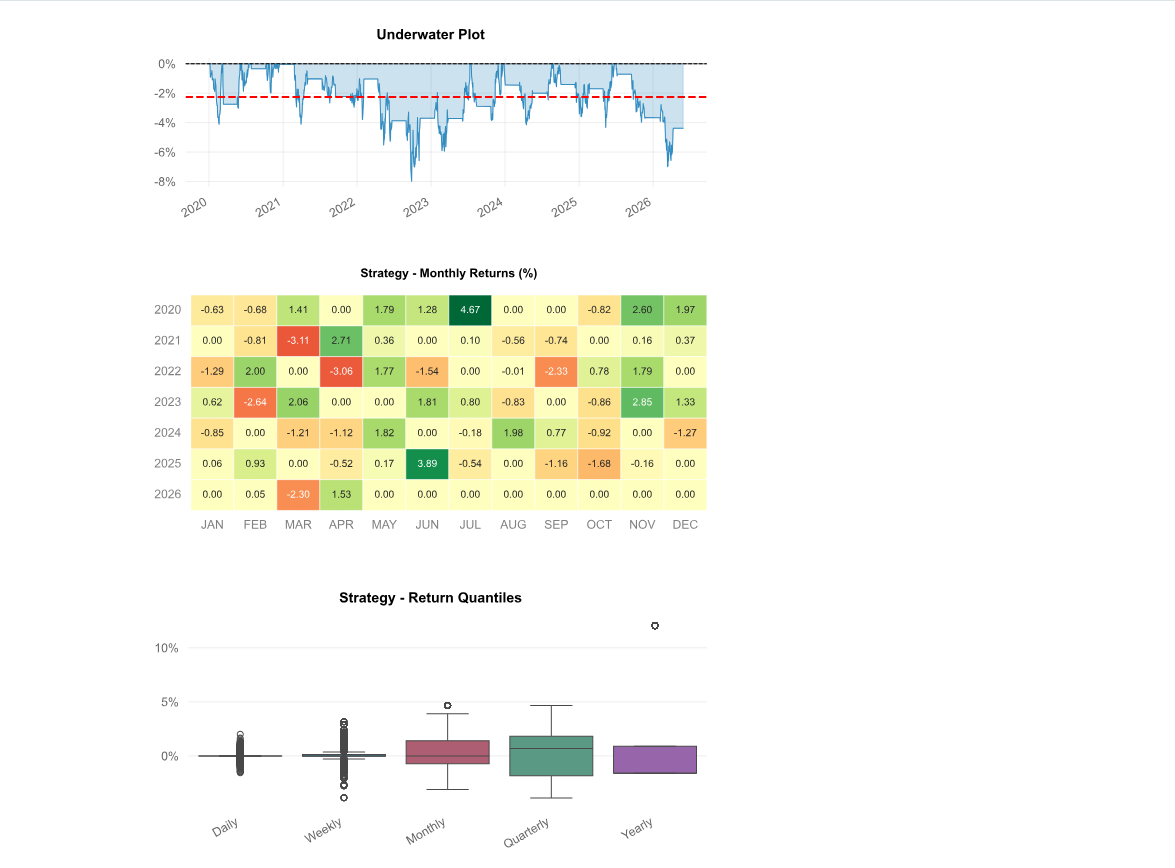
Intuitive charts show the equity curve, maximum profit and maximum loss, helping you understand the risks in different market scenarios before you place an order.
Set Up Strategy Ideas in Plain Language
Assisted Technical Indicator Selection
AI-Enhanced Strategy Logic
Historical Backtest Validation
Risk Visualization
Start Trading in Three Steps
-------------------------- >
1. Sign up for a MASQuant account and choose a plan
-------------------------- >
2. Use the AI Strategy Assistant to build a personalized strategy and download the trading execution file
----------------------------
3. Connect to your broker’s MT5 account and start automated trading
1. Sign up for a MASQuant account and choose a plan
2. Use the AI Strategy Assistant to build a personalized strategy and download the trading execution file
3. Connect to your broker’s MT5 account and start automated trading
MASQuant Backtest Engine
MASQuant Backtest Engine
MASQuant has a built-in professional backtesting engine that integrates historical data, real-time market data, and demo trading, so you can fully validate a strategy under near-real market conditions before you deploy it.
Unified Trading Architecture
Closer to the Real Market
Smaller Gap Between Backtesting and Live Trading
Iterative Strategy Validation
Professional Performance Analysis
Built-in Risk Control Model
Core Features
Historical Backtesting
Win Rate Analysis
Return Statistics
Maximum Drawdown
Trade History
Visual Reports
Data Sources and Security Management
Built on compliance, information security, and transparency, MASQuant is an international quant trading platform that investors, strategy developers, trading teams, and B2B partners can use with peace of mind.
European and Global Exchange Data Support
MASQuant currently integrates financial market data through the MT5 environment.
Supports major brokers worldwide
MASQuant Platform — Supports 90% of Brokers Worldwide
MASQuant Platform —
Supports 90% of Brokers Worldwide
AvaTrade
FXCM
XM
EC Markets
GTCFX
IC Markets Global
GO Markets
ATFX
FP Markets
FXTM
Vantage
VT Markets
Neex
Mitrade
TMGM
OANDA
Exness
Pepperstone
IG
ThinkMarkets
IC Markets
FOREX.com
Swissquote
Ultima Markets
HFM (HotForex)
GKFX Prime
eToro
Dukascopy
FxPro
LMAX Exchange
Tickmill
Yuanta Futures
Capital Futures FX
Supports 90% of brokers worldwide — and many more than we can list here
The MASQuant Platform Supports Major CFD Instruments

EURUSD

GBPUSD

AUDUSD

USDCAD

USDCHF

NZDUSD

EURGBP

XAUUSD
More instruments are being added…
Market Types Supported by the MASQuant Platform
Forex
Precious Metals
Enterprise-Grade Security
We use high-standard, enterprise-grade information security: we never trade on your behalf, never transmit sensitive data, and never access your account. Every trade and action is completed under your control.
Personal Data Protection
Information Security Architecture
Data Backup and Recovery Mechanism
System Requirements
Currently Windows only: MASQuant’s trading features run only on Windows computers. These include downloading strategy execution files, connecting to MT5, setting up automated trading, and executing strategies.
Use a Windows PC for the Following Features
Currently Not Supported
MASQuant Will Keep Evaluating Support for More Platforms
Frequently Asked Questions
AI Strategy Assistant FAQ
Who is the AI Strategy Assistant for?
Just describe your strategy logic in plain language, and the system will help organize, refine, and turn it into backtestable strategy content.
Can I describe my trading logic in plain language?
The AI Strategy Assistant will parse the meaning and organize it into strategy logic you can review and backtest.
Will the AI Strategy Assistant check whether my strategy logic is complete?
You'll still need to confirm for yourself that the finished strategy matches what you intended.
Will the AI Strategy Assistant add risk controls automatically?
Which risk-control settings to actually use is still something you need to confirm based on your own capital size, risk tolerance, and trading environment.
Can AI-generated strategies place orders directly?
Before actual use, please review the strategy content, backtest results, risk performance, and trading environment, and decide for yourself whether to adopt it.
Can I modify an AI-generated strategy?
Before going live, please rely on the editing and saving features shown in the current product interface.
What risk information can I see after a backtest?
For the exact fields displayed, please refer to your product version.
Do I need to know how to code to use the AI Strategy Assistant?
If you need more advanced development integration, check out our API & Developer Tools separately.
Using the AI Strategy Assistant for the first time — where should I start?
The workflow is: enter your strategy idea → review the logic the AI has organized → run a backtest → save the strategy → deploy to a demo or live trading environment as needed.
Does content generated by the AI Strategy Assistant count as investment advice?
Whether to adopt a strategy, how to set parameters, and whether to trade with real funds remain the user's own decisions, and the user bears the associated trading risk.
About the Backtest Engine
What is the MASQuant Backtest Engine?
It's not just a historical performance readout — it gives you a consistent workflow to manage strategies all the way from generation and backtesting through demo trading, deployment, and performance tracking.
How is MASQuant backtesting different from just looking at past performance?
This lets a strategy be validated, before deployment, in a way that more closely mirrors the real trading process.
Why should backtesting and live trading use a unified trading architecture?
MASQuant routes both historical data and live market data through the same data-integration pipeline before format conversion and indicator calculation, narrowing the technical gap between backtest and live trading.
Will the backtest engine simulate trading behaviour?
For the exact fill logic, latency, slippage, and market-friction factors supported, please refer to the product version and official technical documentation.
What performance metrics can I see in a backtest?
For the exact fields displayed, please refer to the current version's page.
What does the backtest report contain?
This information helps you judge whether a strategy has long-term viability, rather than looking only at a single win or loss.
How much historical data can I backtest?
The available historical data range depends on the current product version, instrument support, and data source. For the exact backtestable period, please refer to what's shown in the product.
Can I backtest and optimize a strategy repeatedly?
This creates an iterative strategy-development workflow, letting you repeatedly test, adjust, and compare different strategy versions.
Do I need to rewrite my trading code to go from backtesting to live deployment?
The exact deployment method still depends on the product version, broker environment, and MT5 configuration.
How can I tell if a strategy is worth deploying?
If any of these remain unclear, we recommend holding off on live trading.
Do backtest results mean I'll definitely make money in the future?
Real markets remain subject to volatility, liquidity, slippage, broker execution conditions, and other factors beyond anyone's control.
What is the difference between backtesting and demo trading?
The recommended order is: backtest first, then demo trade, and only then evaluate whether to move into live trading.
What should I do if my backtest doesn't produce results?
If the product interface offers a clear or reset function, you can also reset your strategy conditions and try again. Contact support if needed.