
Strategy Genie —
Complete an Investment Questionnaire and Quickly Build Your Own Strategy
Haven’t studied technical indicators? Can’t read market trends? Can’t code? Even beginners can start quant trading.
Beginner-Friendly
From Questionnaire to Strategy
Continuous Monitoring and Optimization

24-Hour Operation
Cloud Multi-Strategy Management
Five-Year Historical Backtesting
What Is Strategy Genie?
Inside the app, Strategy Genie works in five steps:
- Choose your trading goal — for example a stable, medium-risk, high-return, trend-following or swing trading strategy. The AI analyses based on your goal.
- Set your risk preference — conservative, moderate or aggressive. The strategy design adjusts to your risk settings.
- AI generates the strategy — Strategy Genie analyses the market, screens instruments, generates strategies and optimizes parameters. You don’t need to write any code.
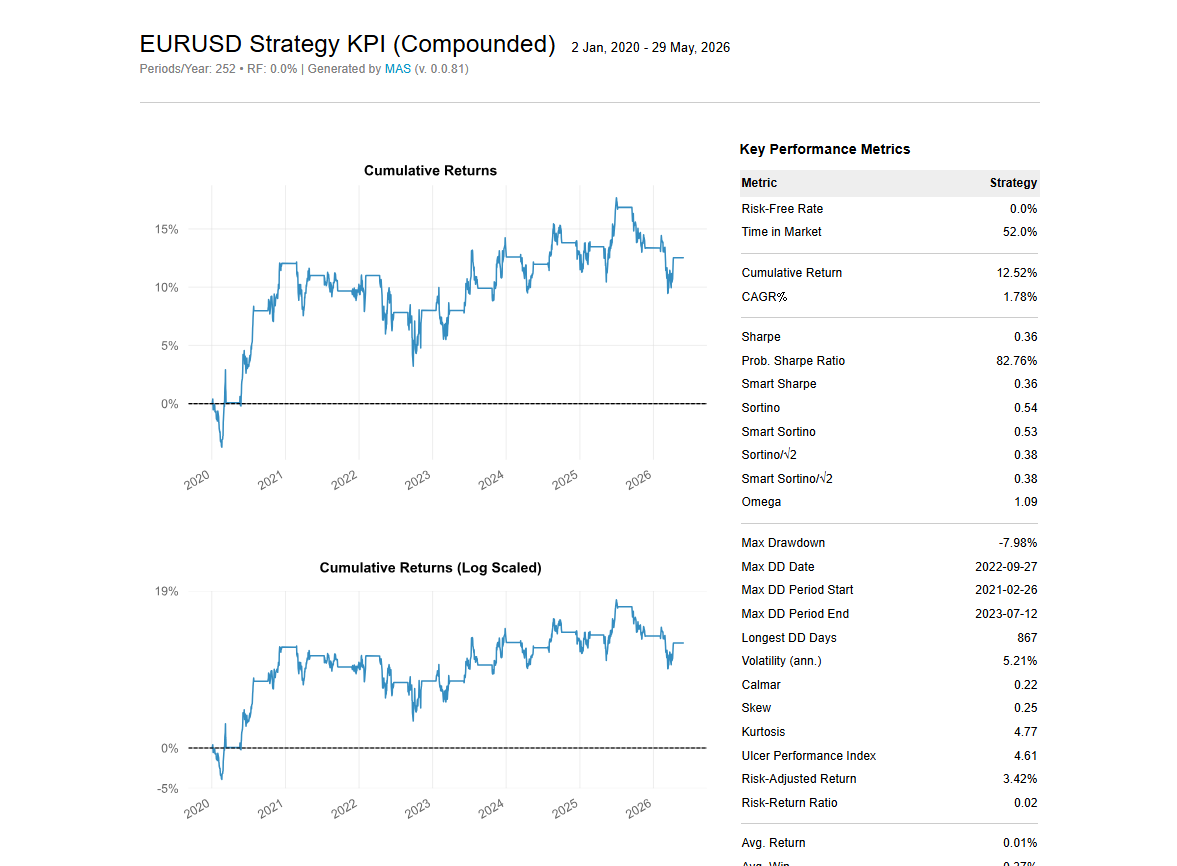
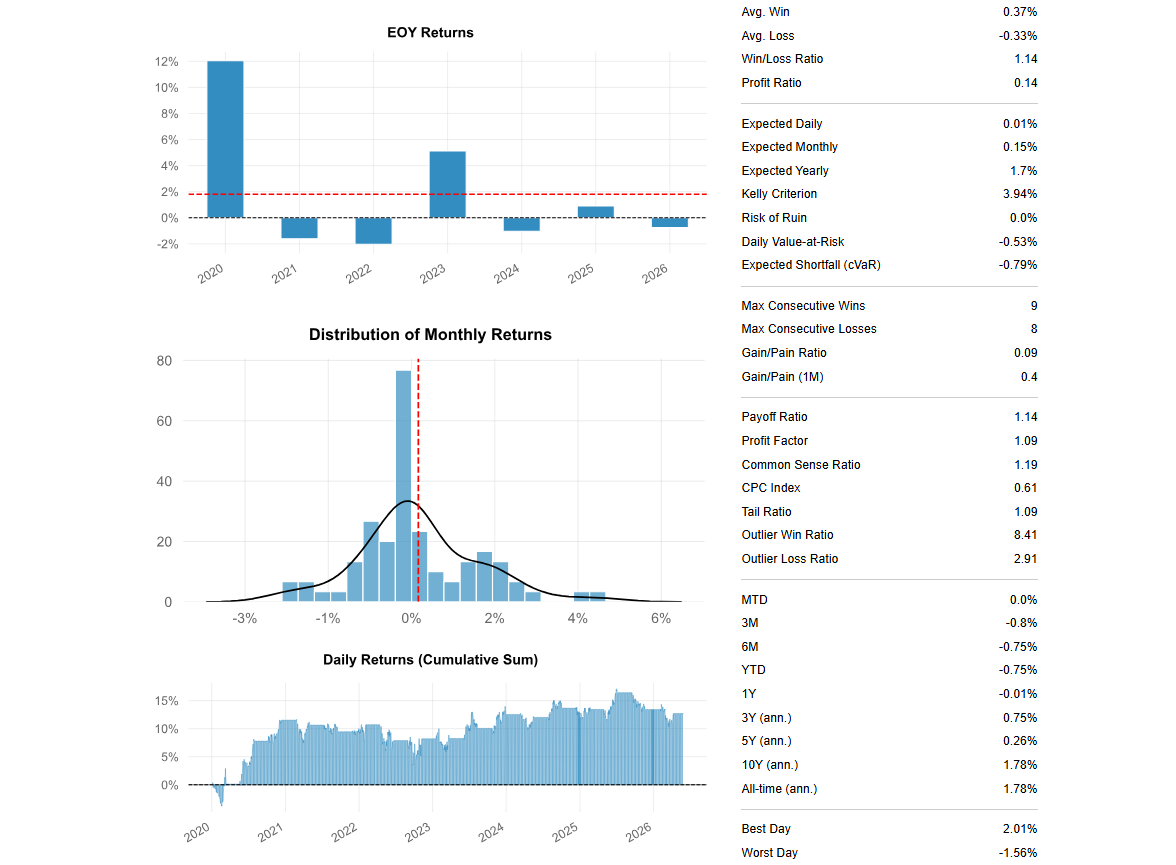
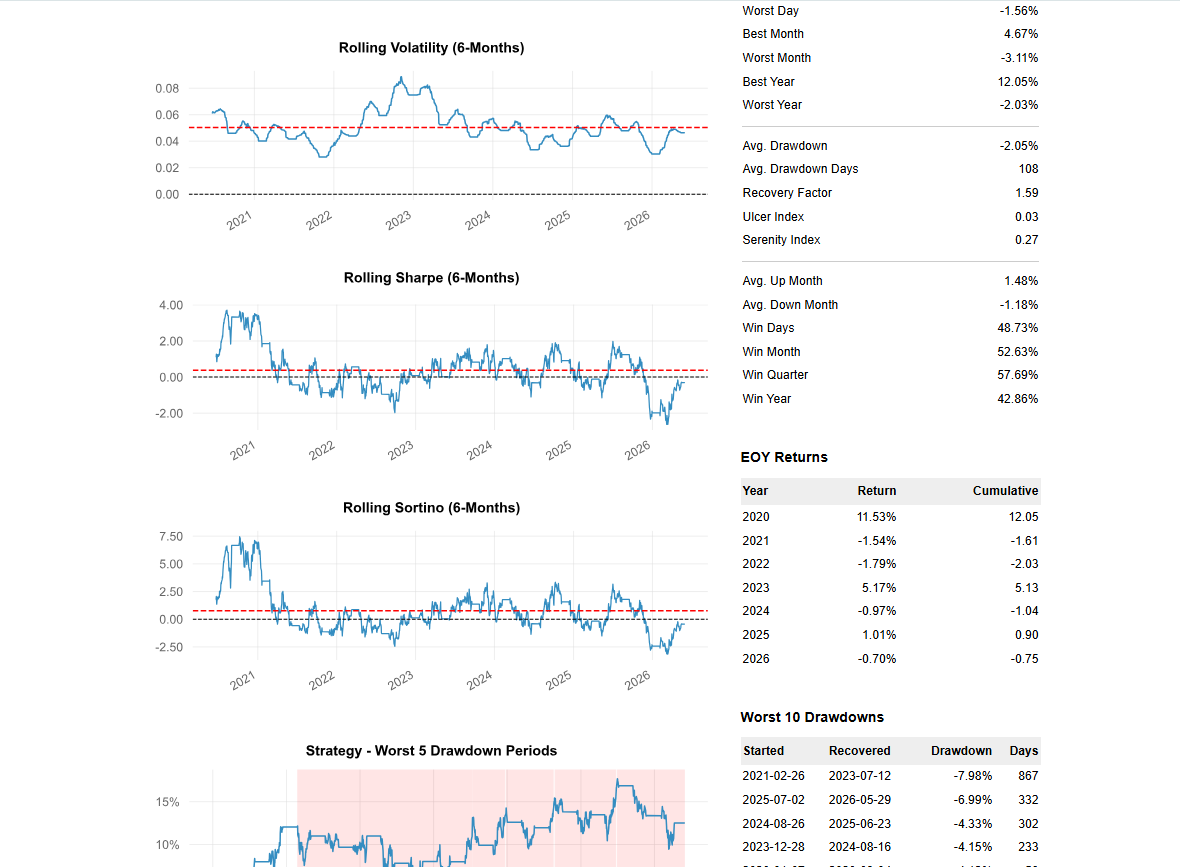
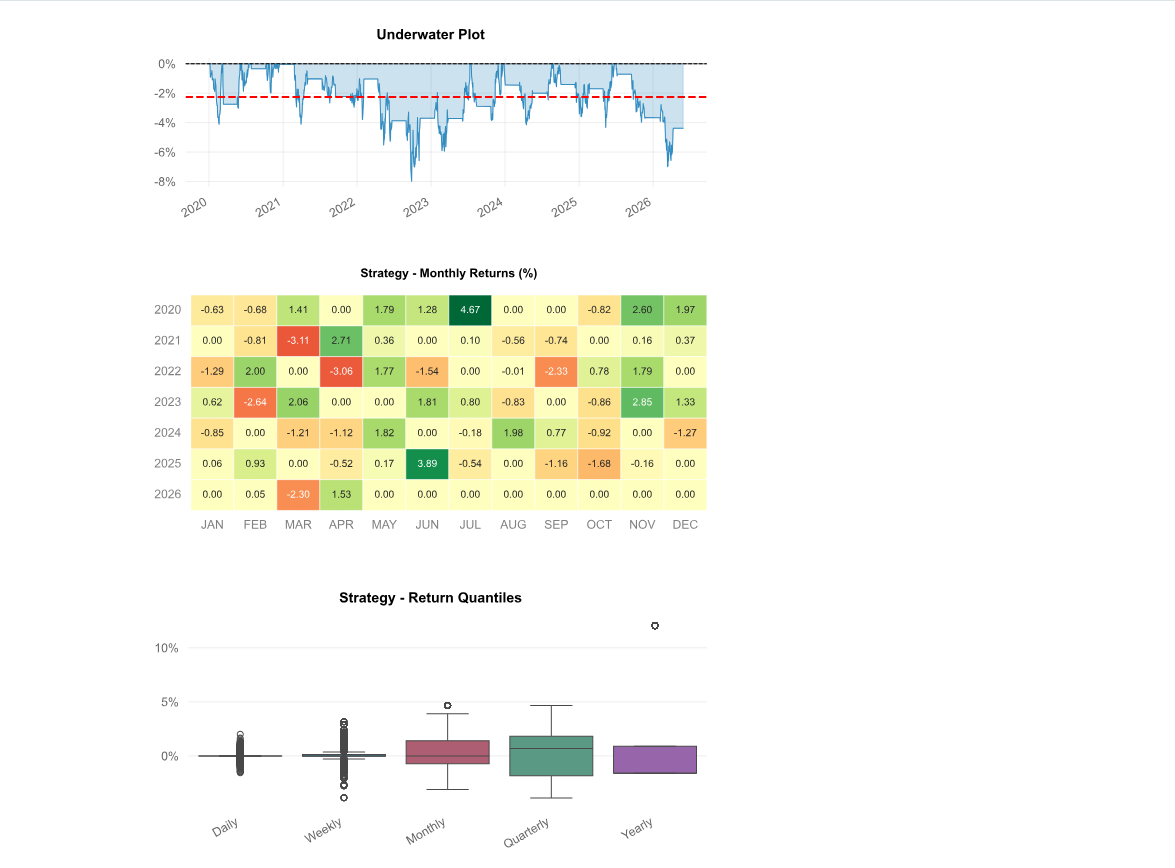
- Automatic backtesting — each generated strategy is backtested automatically, showing total return, maximum drawdown, win rate, number of trades and risk-reward ratio.
- Deploy to MT5 — once you confirm a strategy, MASQuant packages it, generates the executable file and connects it to MT5.

Generates suitable trading strategies based on your return goals, risk appetite, current market conditions and instrument characteristics.

Based on your investment preferences, you get a range of distinct strategies to choose from

Strategy Genie evolves with your strategies, keeping your saved strategies up to date and continuously monitoring how well they fit the market

Compare the performance and risk of high-, medium- and low-frequency trading strategies to help you choose a suitable investment strategy, while strictly limiting the number of strategy executions in live trading

Validate a new strategy’s profit and loss potential and risks with historical data, so you can evaluate its win rate, expected value and maximum drawdown before committing capital, instead of relying on intuition or luck and taking unnecessary losses. Backtests support dynamic charts to help you check strategy stability and see where to optimize.
Investment Goal Analysis
AI Multi-Strategy Generation
Strategy Health Monitoring
Trading Frequency Analysis
Historical Backtest Validation
Start Trading in Three Steps
-------------------------- >
1. Sign up for a MASQuant account and choose a plan
-------------------------- >
2. Fill out the Strategy Genie questionnaire and download the strategy execution file you choose
----------------------------
3. Connect to your broker’s MT5 account and start automated trading
1. Sign up for a MASQuant account and choose a plan
2. Fill out the Strategy Genie questionnaire and download the strategy execution file you choose
3. Connect to your broker’s MT5 account and start automated trading
MASQuant Backtest Engine
MASQuant Backtest Engine
MASQuant has a built-in professional backtesting engine that integrates historical data, real-time market data, and demo trading, so you can fully validate a strategy under near-real market conditions before you deploy it.
Unified Trading Architecture
Closer to the Real Market
Smaller Gap Between Backtesting and Live Trading
Iterative Strategy Validation
Professional Performance Analysis
Built-in Risk Control Model
Core Features
Historical Backtesting
Win Rate Analysis
Return Statistics
Maximum Drawdown
Trade History
Visual Reports
Data Sources and Security Management
Built on compliance, information security, and transparency, MASQuant is an international quant trading platform that investors, strategy developers, trading teams, and B2B partners can use with peace of mind.
European and Global Exchange Data Support
MASQuant currently integrates financial market data through the MT5 environment.
Supports major brokers worldwide
MASQuant Platform — Supports 90% of Brokers Worldwide
MASQuant Platform —
Supports 90% of Brokers Worldwide
AvaTrade
FXCM
XM
EC Markets
GTCFX
IC Markets Global
GO Markets
ATFX
FP Markets
FXTM
Vantage
VT Markets
Neex
Mitrade
TMGM
OANDA
Exness
Pepperstone
IG
ThinkMarkets
IC Markets
FOREX.com
Swissquote
Ultima Markets
HFM (HotForex)
GKFX Prime
eToro
Dukascopy
FxPro
LMAX Exchange
Tickmill
Yuanta Futures
Capital Futures FX
Supports 90% of brokers worldwide — and many more than we can list here
The MASQuant Platform Supports Major CFD Instruments

EURUSD

GBPUSD

AUDUSD

USDCAD

USDCHF

NZDUSD

EURGBP

XAUUSD
More instruments are being added…
MASQuant Platform
Supported Market Types
Forex
Precious Metals
Enterprise-Grade Security
We use high-standard, enterprise-grade information security: we never trade on your behalf, never transmit sensitive data, and never access your account. Every trade and action is completed under your control.
Personal Data Protection
Information Security Architecture
Data Backup and Recovery Mechanism
System Requirements
Currently Windows only: MASQuant’s trading features run only on Windows computers. These include downloading strategy execution files, connecting to MT5, setting up automated trading, and executing strategies.
Use a Windows PC for the Following Features
Currently Not Supported
MASQuant Will Keep Evaluating Support for More Platforms
Frequently Asked Questions
Strategy Genie FAQ
Who is Strategy Genie for?
You start by describing your return goals, risk tolerance, and trading needs in a questionnaire, and the system helps generate a strategy direction you can then backtest and evaluate further.
How does Strategy Genie generate a strategy after I fill out the questionnaire?
Once generated, we recommend running a backtest first — reviewing win rate, returns, maximum drawdown, and risk behaviour — before deciding whether to move on to demo trading or deployment.
I don't understand technical indicators — can I still use Strategy Genie?
That said, before any live deployment we still recommend reading the backtest report and risk metrics to confirm the strategy's behaviour matches your own risk tolerance.
What is Strategy Health Monitoring?
It serves as a prompt for adjusting and reassessing your strategy — it does not guarantee that the strategy will maintain the same performance in future markets.
Can a Strategy Genie strategy go from backtesting to demo or live trading?
This workflow reduces the gap between testing and deployment, though it does not eliminate market risk.
Can I manage multiple strategies at the same time?
For the exact number of strategies you can manage, execution quotas, and feature limits, please refer to your current plan and product version.
How does Strategy Genie reduce the problem of strategies that look good in backtests but fail in live trading?
However, no backtest can guarantee future performance, so it still needs to be evaluated alongside risk-control settings and demo testing.
I'm new to Strategy Genie — where should I start?
1. Register for a MASQuant account and choose a plan
2. Fill out the Strategy Genie questionnaire to get a strategy direction you can evaluate
3. Run backtests and demo tests before deciding whether to connect an MT5 account for deployment
Do I need an MT5 account before using Strategy Genie?
You'll only need a usable MT5 account once you're ready to deploy to a demo or live trading environment; set it up by following the platform's process.
About the Backtest Engine
What is the MASQuant Backtest Engine?
It's not just a historical performance readout — it gives you a consistent workflow to manage strategies all the way from generation and backtesting through demo trading, deployment, and performance tracking.
How is MASQuant backtesting different from just looking at past performance?
This lets a strategy be validated, before deployment, in a way that more closely mirrors the real trading process.
Why should backtesting and live trading use a unified trading architecture?
MASQuant routes both historical data and live market data through the same data-integration pipeline before format conversion and indicator calculation, narrowing the technical gap between backtest and live trading.
Will the backtest engine simulate trading behaviour?
For the exact fill logic, latency, slippage, and market-friction factors supported, please refer to the product version and official technical documentation.
What performance metrics can I see in a backtest?
For the exact fields displayed, please refer to the current version's page.
What does the backtest report contain?
This information helps you judge whether a strategy has long-term viability, rather than looking only at a single win or loss.
How much historical data can I backtest?
The available historical data range depends on the current product version, instrument support, and data source. For the exact backtestable period, please refer to what's shown in the product.
Can I backtest and optimize a strategy repeatedly?
This creates an iterative strategy-development workflow, letting you repeatedly test, adjust, and compare different strategy versions.
Do I need to rewrite my trading code to go from backtesting to live deployment?
The exact deployment method still depends on the product version, broker environment, and MT5 configuration.
How can I tell if a strategy is worth deploying?
If any of these remain unclear, we recommend holding off on live trading.
Do backtest results mean I'll definitely make money in the future?
Real markets remain subject to volatility, liquidity, slippage, broker execution conditions, and other factors beyond anyone's control.
What is the difference between backtesting and demo trading?
The recommended order is: backtest first, then demo trade, and only then evaluate whether to move into live trading.
What should I do if my backtest doesn't produce results?
If the product interface offers a clear or reset function, you can also reset your strategy conditions and try again. Contact support if needed.