MASQuant SDK
Built for Quant Trading Strategy Developers
Skip the framework setup and messy data sources — run a complete strategy backtest within 10 minutes using just a few lines of Python code.
Integrates with the APIs of all MT5-compatible brokers
Provides a variety of example strategy modules
Efficient backtest data processor
Switch the same code freely between demo and live trading
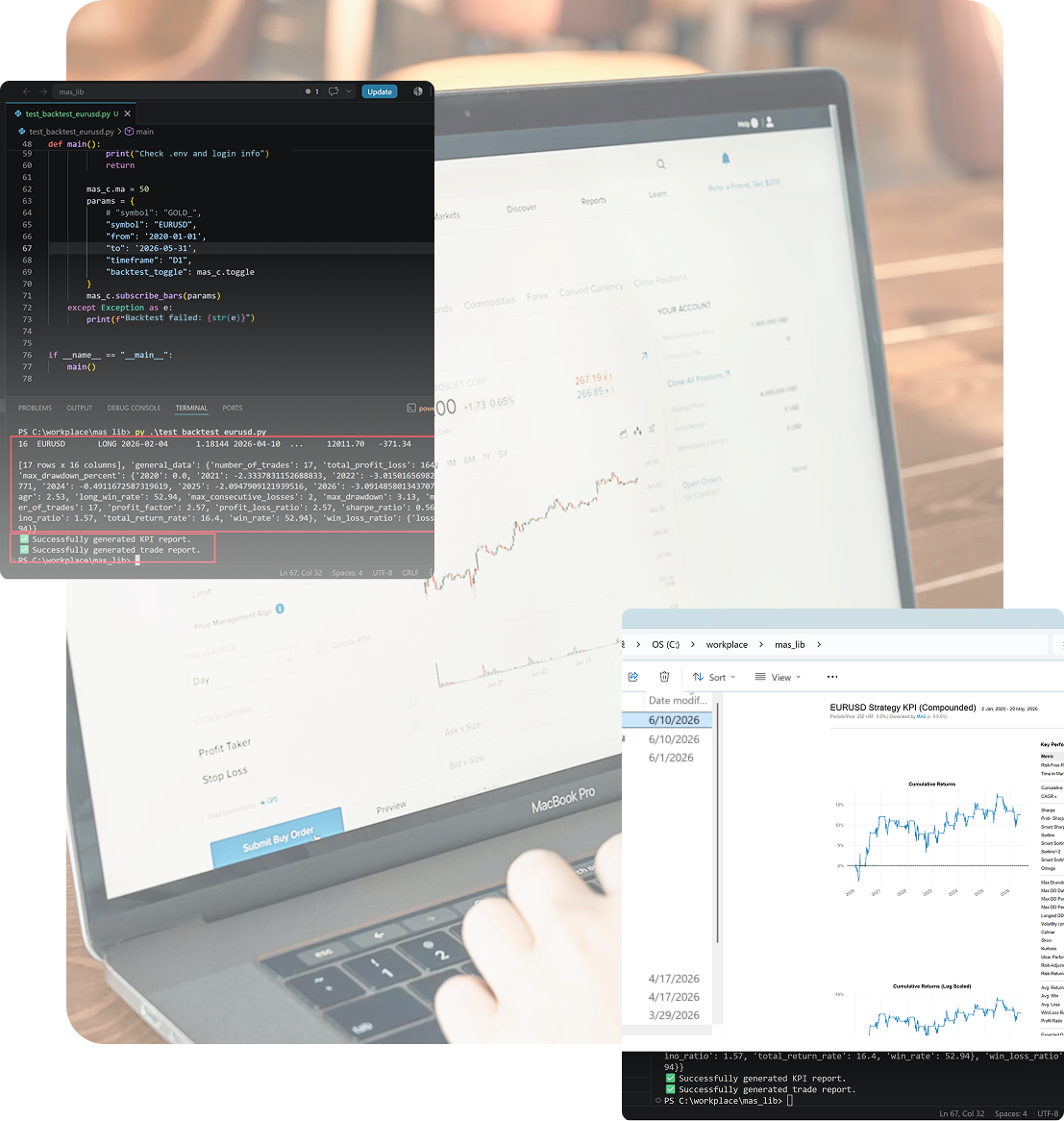
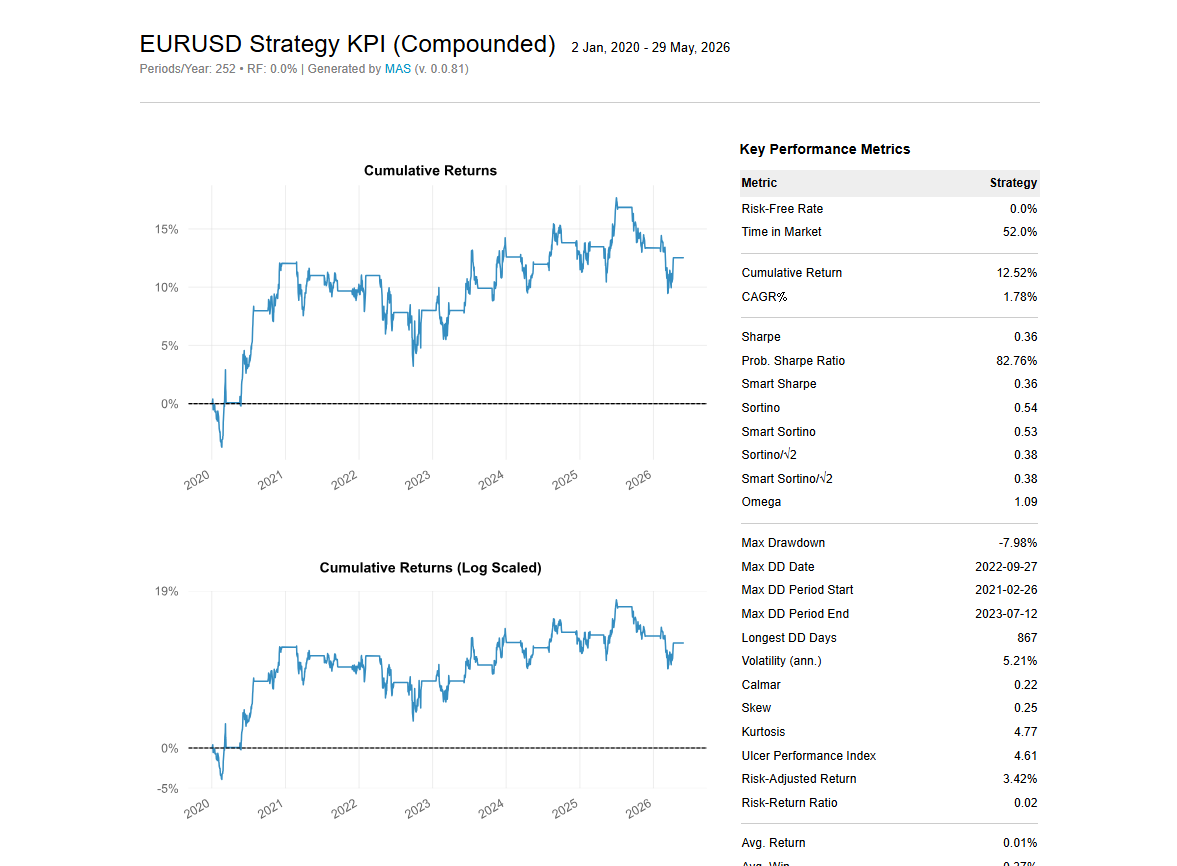
Automatically generates KPI performance reports and dynamic buy/sell point charts
Seamlessly integrates the MASQuant platform with brokers' live trading API modules
MASQuant SDK Features

No tedious framework or environment setup: just install a single package, then load data, validate strategies and export results through a simple API.

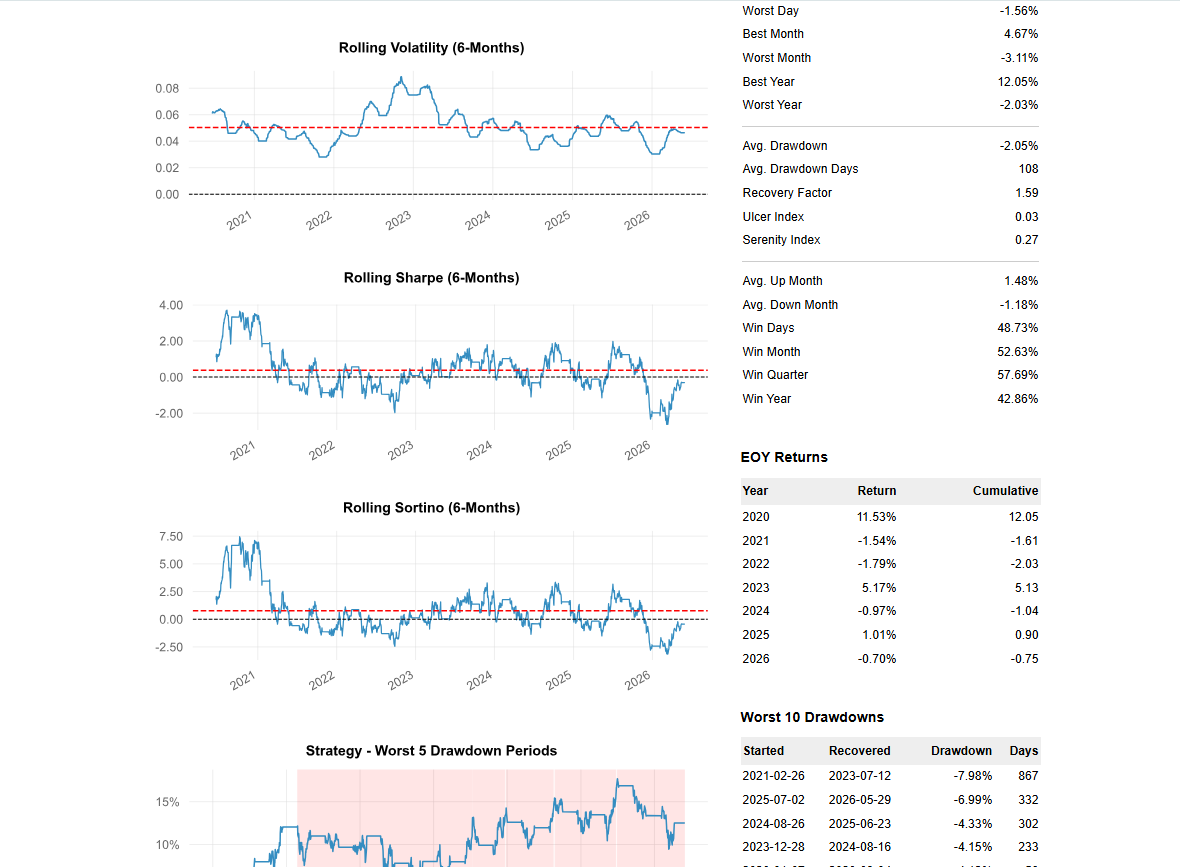
Built-in performance metrics such as the Sharpe ratio, maximum drawdown and annualized return, plus automatically generated visual reports, help you quickly understand a strategy’s performance and risk profile.
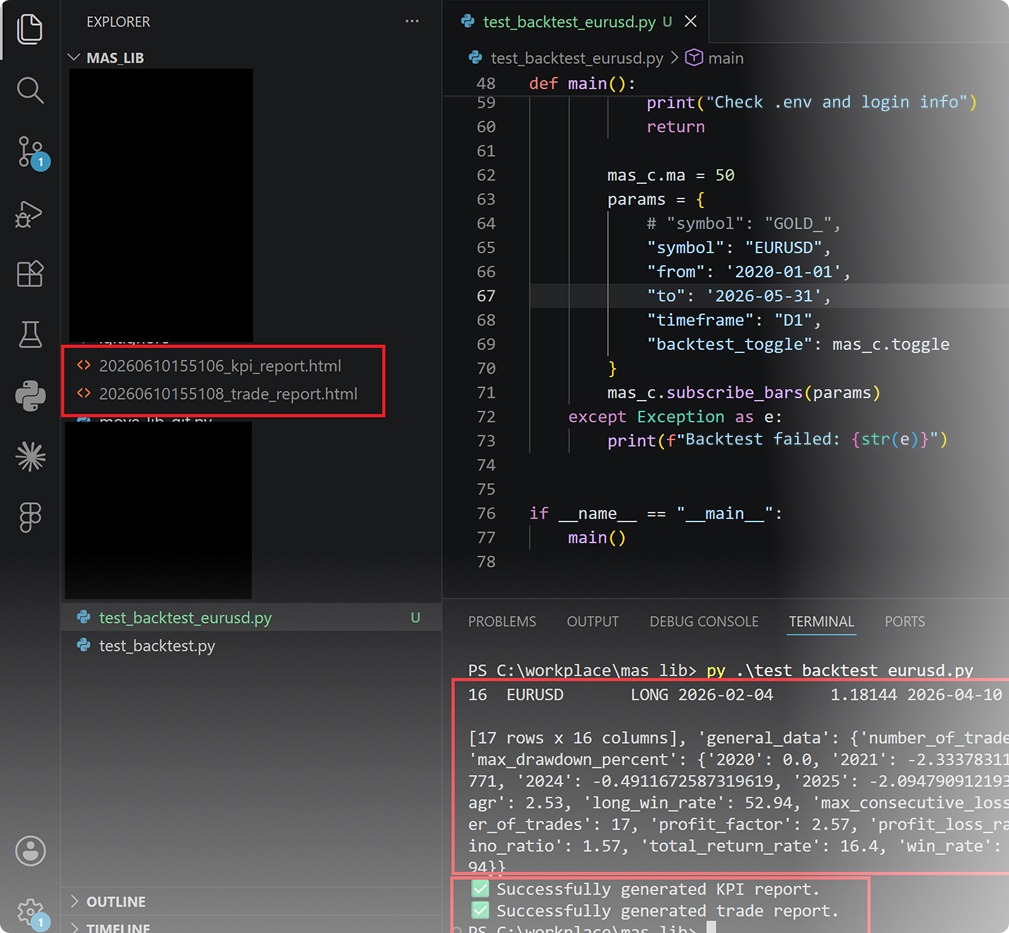
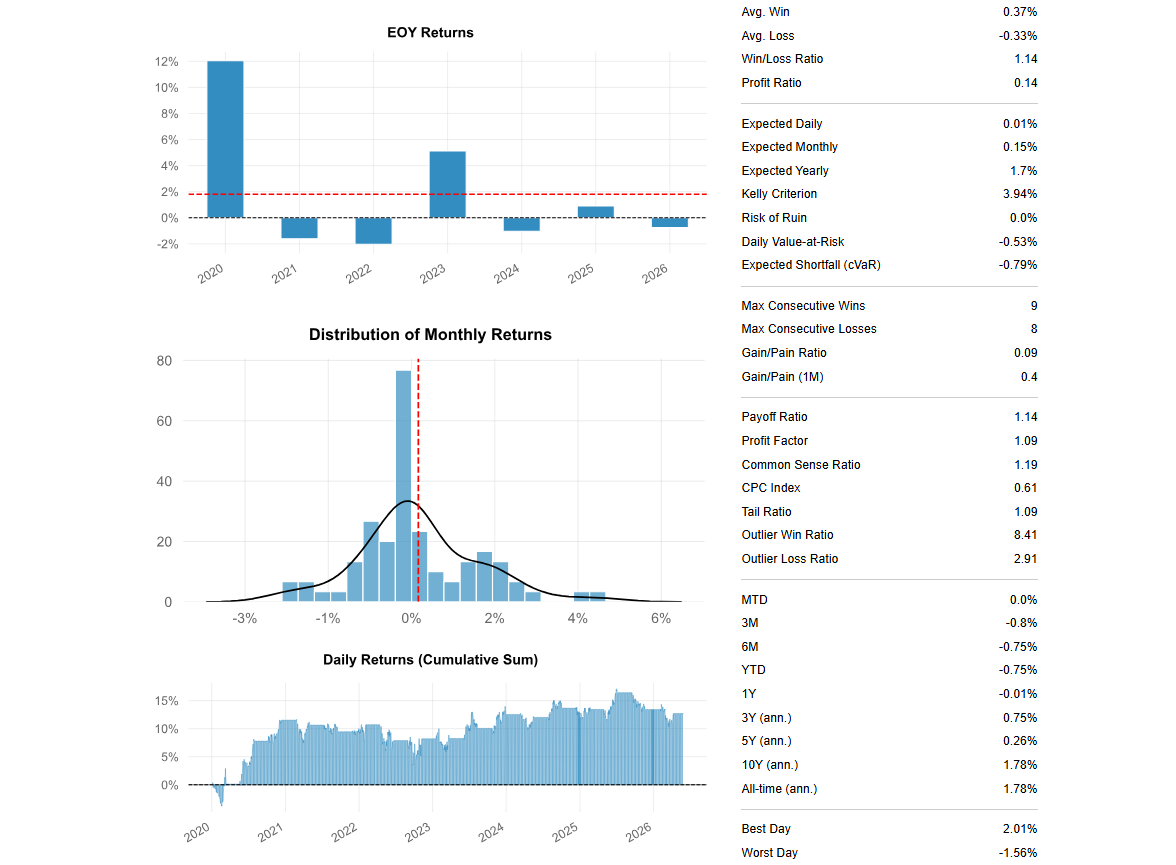
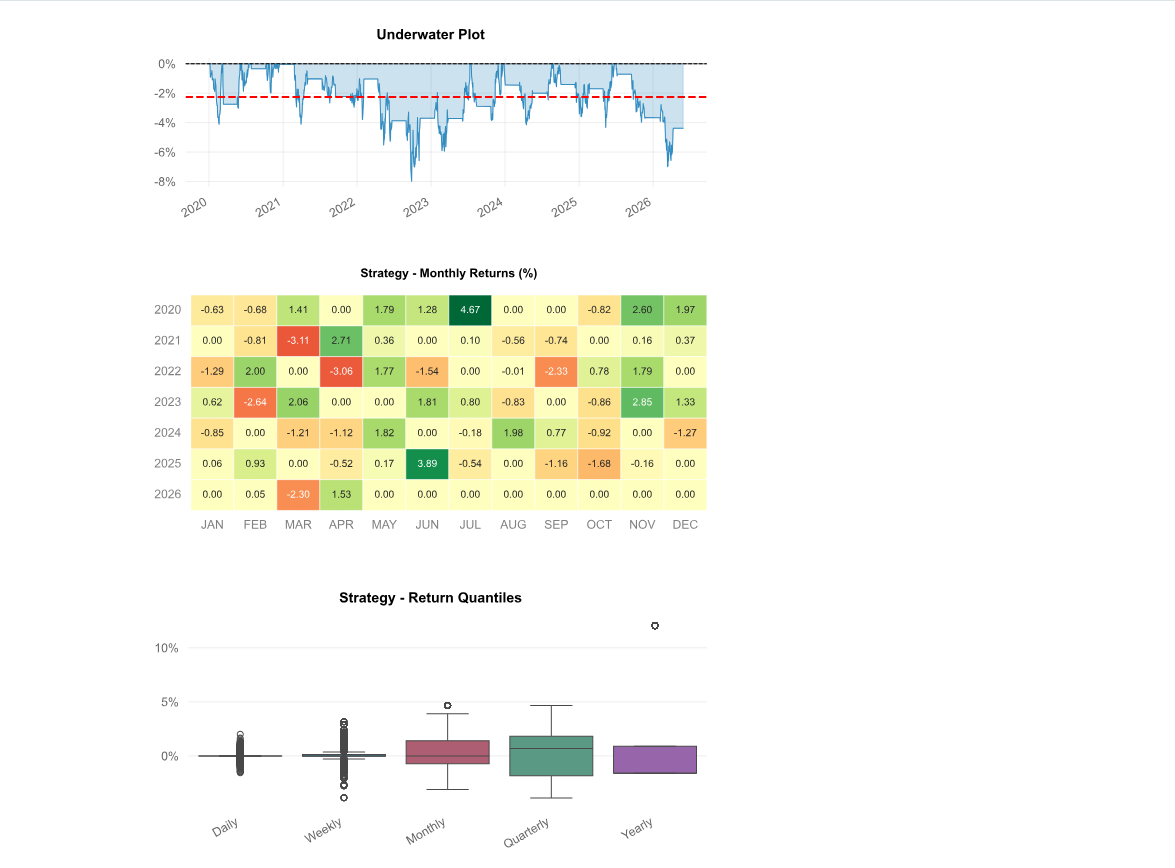
Automatically exports backtest reports and charts, including every trade record, the daily equity curve and summary statistics, so strategy performance is clear at a glance and easy to compare and optimize.
Lightweight One-Click Tool
Modular Performance Analysis
Complete, Transparent Data

MASQuant Backtest Report Tool
The MASQuant Backtest Report Tool is built for quant traders. With no need to install Python or extra packages, you can quickly run strategy backtests locally, review full performance reports, and export data, making strategy validation easy.
MASQuant Backtest Engine
MASQuant Backtest Engine
MASQuant has a built-in professional backtesting engine that integrates historical data, real-time market data, and demo trading, so you can fully validate a strategy under near-real market conditions before you deploy it.
Unified Trading Architecture
Closer to the Real Market
Smaller Gap Between Backtesting and Live Trading
Iterative Strategy Validation
Professional Performance Analysis
Built-in Risk Control Model
Core Features
Historical Backtesting
Win Rate Analysis
Return Statistics
Maximum Drawdown
Trade History
Visual Reports
Data Sources and Security Management
Built on compliance, information security, and transparency, MASQuant is an international quant trading platform that investors, strategy developers, trading teams, and B2B partners can use with peace of mind.
European and Global Exchange Data Support
MASQuant currently integrates financial market data through the MT5 environment.
Supports major brokers worldwide
MASQuant Platform — Supports 90% of Brokers Worldwide
MASQuant Platform —
Supports 90% of Brokers Worldwide
AvaTrade
FXCM
XM
EC Markets
GTCFX
IC Markets Global
GO Markets
ATFX
FP Markets
FXTM
Vantage
VT Markets
Neex
Mitrade
TMGM
OANDA
Exness
Pepperstone
IG
ThinkMarkets
IC Markets
FOREX.com
Swissquote
Ultima Markets
HFM (HotForex)
GKFX Prime
eToro
Dukascopy
FxPro
LMAX Exchange
Tickmill
Yuanta Futures
Capital Futures FX
Supports 90% of brokers worldwide — and many more than we can list here
Market Types Supported by the MASQuant Platform
The MASQuant SDK connects directly to any MT5-compatible broker environment and can access every instrument that broker offers.
Forex
Precious Metals
Energy
Global Stock Indices
US Stock CFDs
ETF CFDs
Cryptocurrency CFDs
Other Instruments Offered by Your Broker
Enterprise-Grade Security
We use high-standard, enterprise-grade information security: we never trade on your behalf, never transmit sensitive data, and never access your account. Every trade and action is completed under your control.
Personal Data Protection
Information Security Architecture
Data Backup and Recovery Mechanism
System Requirements
Currently Windows only: MASQuant’s trading features run only on Windows computers. These include downloading strategy execution files, connecting to MT5, setting up automated trading, and executing strategies.
Use a Windows PC for the Following Features
Currently Not Supported
MASQuant Will Keep Evaluating Support for More Platforms
Frequently Asked Questions
MASQuant SDK FAQ
What is the MASQuant SDK?
It provides strategy backtesting, performance analysis, trading signal generation, report export, and MT5 integration — helping developers and trading teams follow a standardized workflow for strategy development, validation, and pre-deployment analysis.
Are the MASQuant SDK and MASQuant the same product?
The MASQuant SDK is MASQuant's underlying Python SDK, responsible for strategy logic execution, backtest calculation, performance analysis, data processing, and MT5 integration.
MASQuant is the platform; the MASQuant SDK is the underlying technology toolkit.
Can I use the MASQuant SDK if I can't code?
The MASQuant SDK is a Python SDK aimed primarily at developers and strategy researchers with basic Python skills. That said, it comes with complete documentation that walks you through everything from environment setup and data loading to writing strategies, running backtests, and generating reports.
You can learn the fundamentals and see example applications on the official documentation site. Even if you're not comfortable with code at first, you can follow the examples step by step to build your own strategy-backtesting workflow.
If you'd prefer a more intuitive way to work, you can also use the MASQuant platform or MASQuant.Soft to generate, backtest, and deploy strategies through a graphical interface and the AI Strategy Assistant.
Can the MASQuant SDK integrate with MT5 or place orders directly?
Using the MASQuant SDK does not mean the platform trades on your behalf, and it does not constitute discretionary trading, asset management, or investment advisory services.
Which instruments and data sources does the MASQuant SDK support?
Common instruments include EURUSD, GBPUSD, USDJPY, XAUUSD, XAGUSD, US30, NAS100, SPX500, GER40, USOIL, and UKOIL.
Actual instrument coverage and available data history depend on your broker's instrument list, data source, and account permissions.
Will MASQuant SDK backtest results be the same as live trading results?
Differences between backtest and live results can arise from spread changes, slippage, execution delay, broker quote variance, insufficient liquidity, trading-session restrictions, fees, overnight interest, historical data quality, and differences in the strategy's execution environment.
The MASQuant SDK is a tool for strategy development, backtesting, and analysis — it does not provide individualized investment advice and does not guarantee any strategy's future performance. All strategies, signals, backtest reports, and KPI results are provided solely as reference for the user's own judgment and technical analysis.
Does the MASQuant SDK keep my trading funds, account password, or strategy data?
Trading account passwords are never stored in plain text.
When connecting to MT5 or a broker environment, login credentials are managed by the user; if the system needs to store related information, it does so under encryption.
Whether strategy data is stored depends on how you use the platform.
When used locally, strategy data stays on your own computer; if you use MASQuant's cloud features, strategy data may be stored on the platform as needed to support strategy management, backtest records, and license verification.
About the Backtest Engine
What is the MASQuant Backtest Engine?
It's not just a historical performance readout — it gives you a consistent workflow to manage strategies all the way from generation and backtesting through demo trading, deployment, and performance tracking.
How is MASQuant backtesting different from just looking at past performance?
This lets a strategy be validated, before deployment, in a way that more closely mirrors the real trading process.
Why should backtesting and live trading use a unified trading architecture?
MASQuant routes both historical data and live market data through the same data-integration pipeline before format conversion and indicator calculation, narrowing the technical gap between backtest and live trading.
Will the backtest engine simulate trading behaviour?
For the exact fill logic, latency, slippage, and market-friction factors supported, please refer to the product version and official technical documentation.
What performance metrics can I see in a backtest?
For the exact fields displayed, please refer to the current version's page.
What does the backtest report contain?
This information helps you judge whether a strategy has long-term viability, rather than looking only at a single win or loss.
How much historical data can I backtest?
The available historical data range depends on the current product version, instrument support, and data source. For the exact backtestable period, please refer to what's shown in the product.
Can I backtest and optimize a strategy repeatedly?
This creates an iterative strategy-development workflow, letting you repeatedly test, adjust, and compare different strategy versions.
Do I need to rewrite my trading code to go from backtesting to live deployment?
The exact deployment method still depends on the product version, broker environment, and MT5 configuration.
How can I tell if a strategy is worth deploying?
If any of these remain unclear, we recommend holding off on live trading.
Do backtest results mean I'll definitely make money in the future?
Real markets remain subject to volatility, liquidity, slippage, broker execution conditions, and other factors beyond anyone's control.
What is the difference between backtesting and demo trading?
The recommended order is: backtest first, then demo trade, and only then evaluate whether to move into live trading.
What should I do if my backtest doesn't produce results?
If the product interface offers a clear or reset function, you can also reset your strategy conditions and try again. Contact support if needed.