What Is the ATR Indicator? It Doesn’t Call Buys or Sells, but It Sets Your Stop Distance and Position Size
Many people use a fixed number for their stop loss: quiet market or volatile, they always use the same number of points.
In a quiet market, that distance might be just right. When the market turns volatile, the same distance may be nothing more than a normal swing within a single candle — and the trade gets knocked out again and again.
The ATR indicator is a ruler for measuring “how much the market is swinging right now”. It won’t tell you whether to buy or sell, but it decides how far away your stop should be.
This is part five of MASQuant’s “Trading Academy · The Truth About Indicators” series. In the beginner series, How to Set a Stop Loss? explained that your stop belongs where your reason no longer holds, and that it must be further away than the price’s normal swings. This part takes a closer look at the ruler that measures those “normal swings” — how ATR is calculated, how to use it to set a stop, and why your position must shrink once your stop gets wider.
The short answer
ATR doesn’t call buys or sells, but it decides your stop distance and your position size.
Your stop should breathe with volatility; when the stop gets wider, the position has to get smaller.
What is the ATR indicator? A ruler for “normal swings”
ATR stands for Average True Range. It was introduced by J. Welles Wilder in his 1978 book New Concepts in Technical Trading Systems — the same book that gave us RSI.
In plain terms, ATR measures how much each candle has swung, on average, over the last 14 candles. The bigger the number, the more volatile the market; the smaller, the quieter.
Before using it, remember two things:
- It has no direction. ATR only measures range, not up or down. A big rally makes ATR rise, and so does a big drop. ATR going up doesn’t mean price will rise; ATR going down doesn’t mean price will fall.
- Its unit is the instrument’s price unit, not a percentage. So you can’t compare ATR directly across instruments; to compare, a common approach is to divide ATR by price and look at it as a percentage.
True Range (TR): why not just high minus low
What ATR averages is not simply “high − low” but the True Range (TR). A candle’s true range is the largest of these three numbers:
TR = the largest of:
① current high − current low
② | current high − previous close |
③ | current low − previous close |
The last two terms are there to include gaps. A simple example (round numbers for illustration, not market data):
Previous close 100; this candle gaps up, high 105, low 103

① 105 − 103 = 2
② | 105 − 100 | = 5
③ | 103 − 100 | = 3

TR = 5
Looking only at high minus low, you’d think this candle moved just 2; but measured from the previous close, price actually traveled 5. For your stop, that 5 is what’s real — your trade has to absorb the gap just the same.
How ATR is calculated: 14 candles, Wilder smoothing
Once you have each candle’s TR, ATR averages them. The most common default is 14 candles, averaged with Wilder smoothing:
First ATR = simple average of the first 14 TRs
Then, for each candle:
Today's ATR = (yesterday's ATR × 13 + today's TR) ÷ 14
This method has an important consequence: each new candle carries only 1/14 of the weight.
Another simple example (numbers for illustration, not market data): yesterday’s ATR is 1.0, and today a big candle with TR = 4.0 suddenly appears:
(1.0 × 13 + 4.0) ÷ 14 = 17 ÷ 14 ≈ 1.21One big candle moves ATR only from 1.0 to about 1.21. Several big candles in a row are needed before ATR really rises. So ATR lags: in the first few candles after the market turns volatile, it hasn’t caught up; right after the market calms down, it’s still hanging high.
A few calculation details:
- Strictly speaking, Wilder smoothing also keeps a tiny weight for older candles (smaller the older they are), but “the average swing over the last 14 candles” is a good enough way to think about it.
- Some charting software calculates ATR with a simple average instead of Wilder smoothing, so the numbers may differ slightly between platforms.
- When setting a stop, you usually use the ATR from the last closed candle; on a candle that hasn’t closed yet, ATR keeps jumping around.
- ATR follows the chart timeframe: on a 5-minute chart it measures swings per 5 minutes; on a daily chart, swings per day.
A stretch of market: quiet, then volatile
The illustration uses a simulated market computed by a program (not a real instrument). At first it’s quiet, every candle is small and ATR is low; then the market suddenly turns volatile, candles get bigger and bigger, and ATR expands with them.
In the illustration, ATR in the quiet stretch is about 0.48, and in the volatile stretch about 1.71 — more than three times larger.
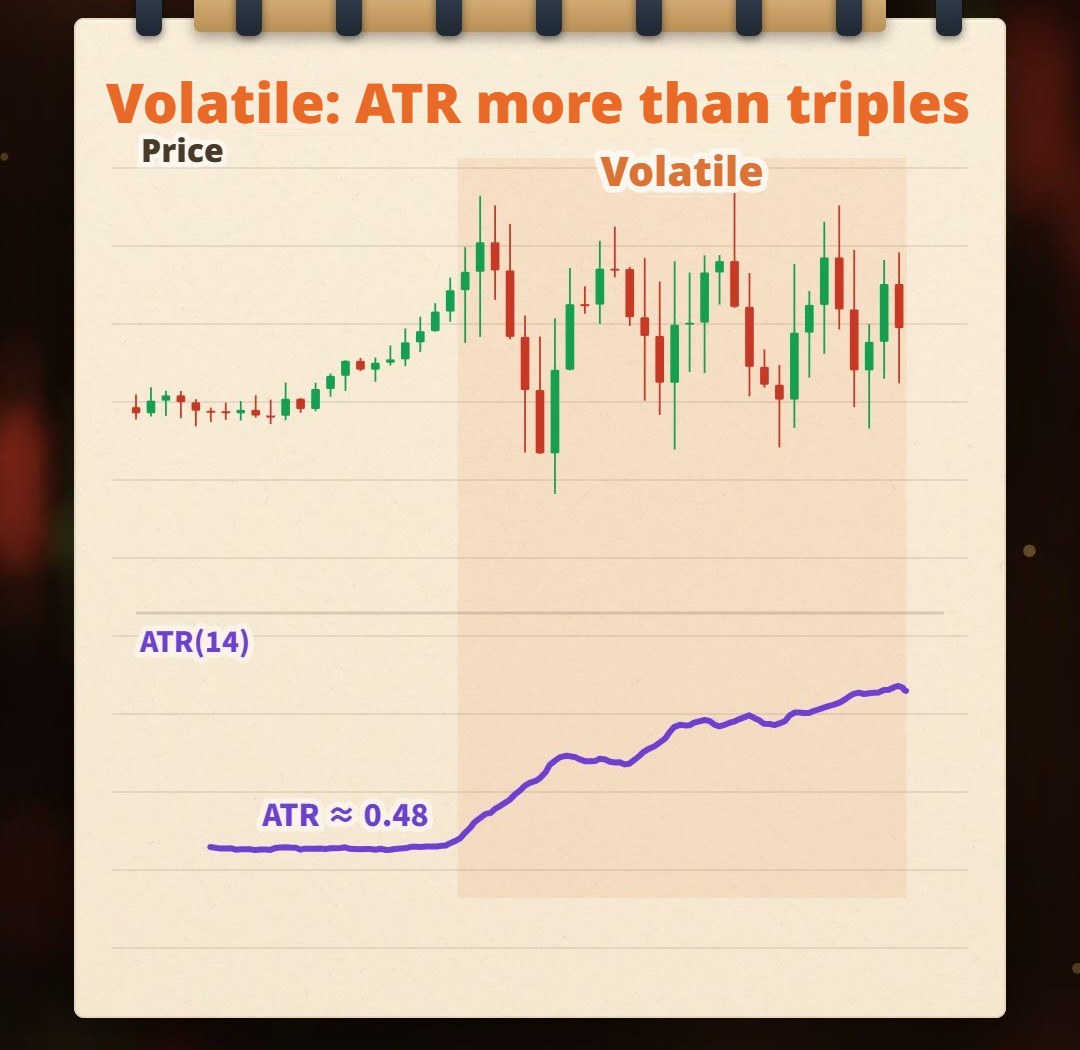
The same instrument can swing several times more over a period of time. If your stop keeps the same distance throughout, what happens?
Fixed stop vs. 2× ATR stop
Fixed stop: set for the quiet market, distance never changes
Suppose your stop was set based on the swings in the quiet stretch, and its distance never changes after that.
In the quiet stretch, it may be just right. In the volatile stretch, the same distance is only a candle’s normal swing, and price touches it with the slightest wobble — exactly the “shaken out” described in How to Set a Stop Loss.
In the illustration, during the same volatile stretch, the fixed stop gets knocked out again and again — 16 times in total.
(How the illustration counts: after each candle closes, a long stop is placed at “close − stop distance”, and if the next candle’s low touches it, that counts as one knockout. The fixed stop distance = 2× the average ATR of the quiet stretch, about 0.96.)
2× ATR stop: breathing with volatility
Use “2× ATR” as the stop distance instead:
Long: stop = entry − 2 × ATR
Short: stop = entry + 2 × ATR
When the market is volatile, ATR rises and the stop automatically widens; when it’s quiet, ATR falls and the stop automatically tightens. In stop-distance terms, with the same 2× ATR, the illustration’s stop is about 0.96 in the quiet stretch and about 3.4 in the volatile stretch.
Same volatile stretch, same counting method: the 2× ATR stop (distance = 2× the current candle’s ATR) is knocked out only 2 times — far fewer.
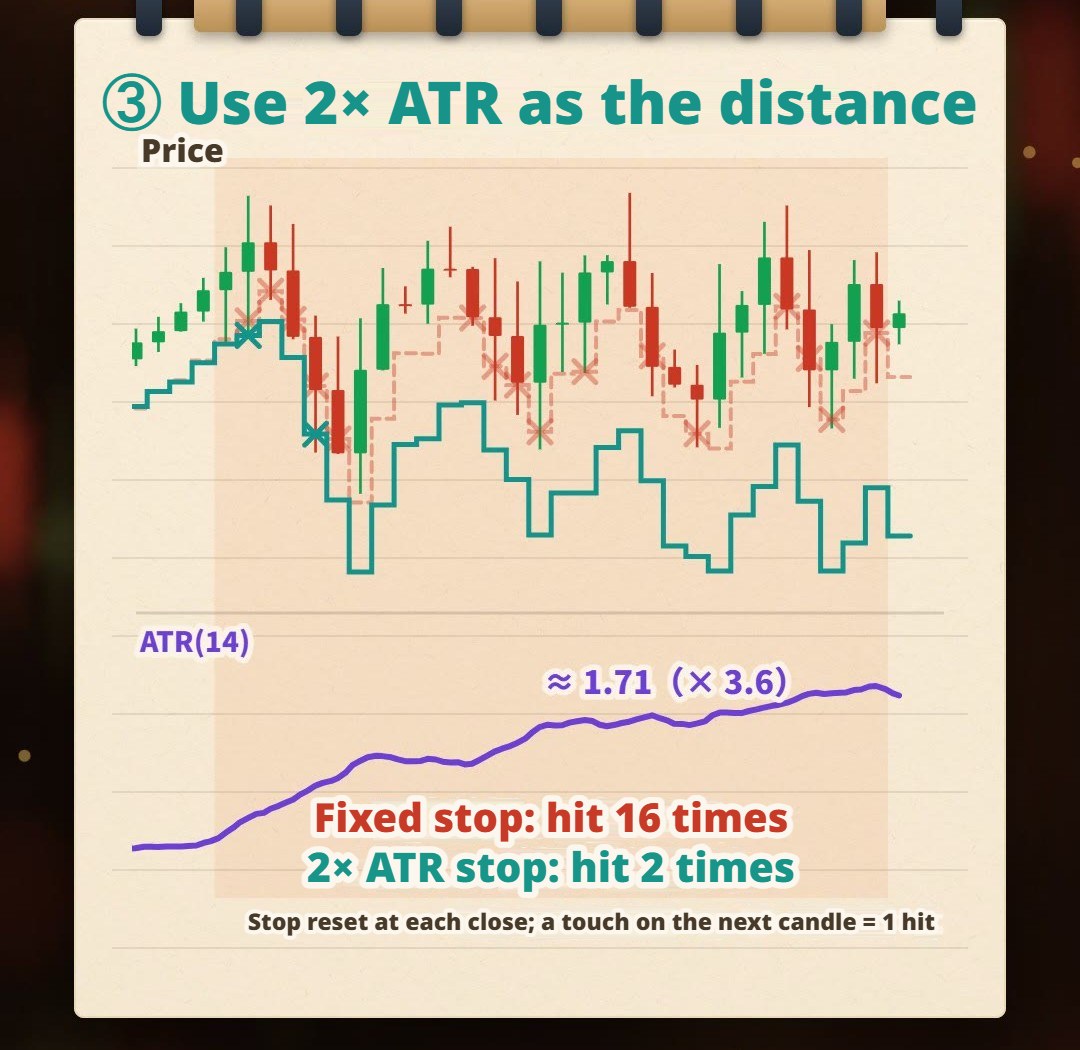
A stop isn’t a fixed number of points; it has to breathe with volatility.
But two things need to be made clear.
First, fewer knockouts doesn’t mean more profit. With a wider stop, every real stop-out happens after price has traveled further. How much each trade loses depends on your position size (next section); how this stop performs overall on your instrument can only be known by backtesting.
Second, “breathing” refers to the stop distance for each new entry. The stop distance is set by ATR at the time of entry; once you’re in a trade, don’t move your stop further away just because ATR has grown — that’s the “moving your stop back as soon as the trade goes red” from How to Set a Stop Loss, and the maximum loss you calculated in advance disappears. If you use ATR for a trailing stop, the common rule is to only move the stop in your favor, never back.
When the stop gets wider, the position has to get smaller
When the stop distance changes, the lot size has to change too. The formula was broken down in How to Calculate Lot Size? and used again in How to Set a Stop Loss; here we simply replace the stop distance with ATR:
Stop distance = multiple × ATR
Lots = acceptable loss ÷ (stop distance × value per tick)
A simple example (round numbers for illustration, not market data): the same instrument has an ATR of 5 points when quiet and 15 points (three times) when volatile, and the stop is always 2× ATR:
| Market | ATR | Stop distance (2× ATR) | Lots | Maximum loss (relative) |
|---|---|---|---|---|
| Quiet | 5 points | 10 points | 3 lots | 10 × 3 = 30 |
| Volatile, lots unchanged | 15 points | 30 points | 3 lots | 30 × 3 = 90 |
| Volatile, lots reduced | 15 points | 30 points | 1 lot | 30 × 1 = 30 |
For the same instrument, each point is worth the same amount, so you can compare “distance × lots” directly. With a stop three times wider and the same lots, the maximum loss triples; only by cutting lots to one third does the most you can lose stay the same.
When the stop gets wider, the position has to get smaller — only then does the most you can lose stay the same.
Conversely, when the market is quiet and the stop tightens, the same acceptable loss gives a larger lot size. That’s just the lot size at which “the loss equals your set amount if the stop is hit exactly”; whether to trade that much is still your own risk decision.
A few caveats:
- Round the calculated lot size down to the platform’s minimum order unit, never up. If even the minimum unit would lose more than your acceptable loss when the stop is hit, then by the logic of How to Set a Stop Loss, skip the trade.
- Stops aren’t guaranteed to fill at the set price. During gaps or fast markets there may be slippage, making the actual loss larger than calculated; the closer the stop and the bigger the lots, the bigger the impact of the same slippage.
- ATR is calculated from past candles, so it lags: in the first few candles after the market turns volatile, an ATR-based stop can still be knocked out; and it won’t warn you about sudden news or gaps.
2× is just a demonstration: there’s no standard multiple
We use 2× ATR here to demonstrate “a stop that follows volatility” — not to say 2× is the right answer. People use 1×, 1.5×, 2× and 3×; it depends on:
- Instrument: some instruments often have long wicks or gaps, so the stop may need more multiples of room.
- Timeframe: ATR on a 5-minute chart and a daily chart can differ a lot; the timeframe you take ATR from should match how long you plan to hold.
- Strategy: how much room your entry reason needs to give price before it’s proven wrong.
- Costs: with a very tight stop, the spread takes a larger share of it.
Choosing the multiple is a trade-off:
| Multiple | Stop | Chance of being knocked out | Lots (same acceptable loss) | P&L for the same price move |
|---|---|---|---|---|
| Small | Close | Higher | Larger | Larger |
| Large | Far | Lower | Smaller | Smaller |
For any single trade, the further the stop, the lower — never higher — the chance of it being touched; but your lots shrink too. Which multiple works best overall can’t be worked out in your head; test it on your instrument and your timeframe.
There are also two ways to use an ATR stop, depending on your strategy:
- As a check: following How to Set a Stop Loss, first find where “your reason no longer holds”, then confirm that distance is at least some multiple of ATR. Structure decides the location; ATR confirms it isn’t inside normal swings.
- As the stop itself: stop = entry ± multiple × ATR, the approach demonstrated here. The upside is a clear rule that can be written as conditions and backtested; the limit is that it only knows volatility, not where your entry reason fails.
Also, ATR’s period of 14 isn’t mandatory. A shorter period makes ATR react faster but jumpier; a longer one makes it smoother but slower.
Common mistakes
1. Treating ATR as a buy or sell signal
ATR rising only means bigger swings, not that price will rise; a sharp drop also makes ATR rise. ATR doesn’t call buys or sells — using it to judge direction is like using a ruler as a compass.
2. Comparing ATR across instruments or timeframes directly
ATR is in price units, so the ATR numbers for gold and EUR/USD aren’t comparable; ATR from a 5-minute chart and from a daily chart can’t be mixed either.
3. Widening the stop without reducing lots
If ATR triples and your stop widens threefold but your lots don’t change, your maximum loss triples too. When you set stops with ATR, always calculate lots along with it.
4. Moving your stop further away after entry because ATR grew
ATR sets your stop distance at entry. Moving the stop further away after entry is redefining “being wrong” after the fact, and the maximum loss you calculated in advance no longer exists. Adjusting in the direction that reduces risk is a different matter.
FAQ
What is the ATR indicator?
ATR (Average True Range), introduced by J. Welles Wilder, measures the average range of each candle over a recent period (commonly 14 candles by default); a bigger number means a more volatile market. It has no direction and doesn’t call buys or sells, and it’s commonly used to set stop distance and position size.
How is ATR calculated?
First calculate each candle’s True Range (TR): the largest of the current high minus low, the absolute value of the current high minus the previous close, and the absolute value of the current low minus the previous close. Then average TR with Wilder smoothing: the first ATR is the simple average of the first 14 TRs, and each subsequent value is “yesterday’s ATR × 13 plus today’s TR, divided by 14”.
What ATR multiple should I use for a stop?
There’s no standard answer. People use 1×, 1.5×, 2× and 3×, depending on the instrument, timeframe, strategy and trading costs. A bigger multiple means a further stop and a lower chance of being knocked out, but smaller lots. The right multiple should be decided by backtesting on your own instrument, not by a fixed rule.
Does a rising ATR mean price will go up or down?
Neither. ATR only measures the size of moves, not direction. Both big rallies and big drops make ATR rise, so ATR alone can’t tell you whether to buy or sell.
How do I calculate position size with an ATR stop?
Stop distance = multiple × ATR; lots = acceptable loss ÷ (stop distance × value per tick). When ATR expands and the stop widens, lots must shrink so the maximum loss doesn’t grow. This assumes the stop fills at the set price; during gaps or fast markets there may be slippage, and the actual loss can be larger.
Do I have to use 14 as the ATR period?
No. 14 is the most common default, not a standard answer. A shorter period reacts faster to changes in volatility but is less stable; a longer period is smoother but slower. Which period to use should be tested together with your stop multiple.
Final thoughts
Indicators like RSI, KD and MACD are often used to find entries and exits. ATR is different: it doesn’t call buys or sells. It answers another question — how much is the market swinging right now — and with it, how far your stop should be and how big your position should be.
ATR doesn’t call buys or sells, but it decides your stop distance and your position size.
What ATR multiple suits your instrument? Backtest it with our AI Strategy Assistant and find out.
Write your entry conditions plus “stop = 2× ATR” in one sentence, drop it into MASQuant’s AI Strategy Assistant, and the backtest starts with a click. The backtest environment includes real-world market frictions such as spreads, slippage, changing liquidity and execution delays. Swap 2× for 1.5× or 3× and run it again to see which multiple gets knocked out too often on your instrument and which is set too far away. A backtest tells you “how these conditions performed in past markets” — it isn’t a guarantee of the future, and it won’t decide for you how much risk to take.
An idea only becomes a strategy once it’s been tested.
The charts and numbers in this article come from a program-generated simulated market and don’t represent the actual price action of any instrument.
Risk disclosure: CFDs are high-risk financial products and can lead to rapid loss of capital. Past performance does not guarantee future results. All strategies and backtests are for reference only and do not constitute investment advice. Please read our Risk Disclosure carefully before trading.
Further reading: